

In short
To enroll in the EU Digital Product Passport Registry (the EU DPP Registry), a company needs an EU Login and a qualified electronic seal (QSeal) from a provider on the EU/EEA trusted list. It completes a form, downloads a declaration sealed by the Commission, adds its own seal, and uploads it. Verification is automatic and lasts up to three years.
Most of the work is a handful of decisions and one purchase, made before anyone opens the registry. This guide is written to be followed from top to bottom: what to decide, how to choose a seal provider, the five steps, and the mistakes that cost time. We went through it ourselves in October 2026 and got in on the second attempt.
Sooner or later, someone in your company gets this task in one sentence: get us into the EU registry. It sounds like a form. The form exists, and it takes ten minutes.
Everything around it takes weeks: a seal has to be bought from the right kind of provider, in the right variant, with the company’s details written the right way, and someone has to hold it. And the registry does not assess what you send in; it compares what you typed with what is in the seal, character by character.
We were verified ten calendar days after we ordered our seal, on the second upload. This is the guide we would have wanted on day one.
If the passport itself is new to you, start with what a Digital Product Passport is. We have also covered what the registry stores and what it doesn’t and why it checks your identity before your data. This article is about how to do it: decisions, screens, fields, and mistakes.
We are a Norwegian company, so our own enrollment is the example throughout. The steps are the same for a company anywhere in the EU or the EEA, and the two things that differ by country, which provider can issue your seal and how your registration number is written, are marked where they come up.
Two words are easy to mix up. You enroll your organization once, and the registry verifies it (its own spelling is “enrolment,” and the button says “Enrol New Organisation”). Passports are what you register, afterward: one registration per passport. This guide is about the first.
EU DPP Registry enrollment at a glance
| When | What you do | Who |
|---|---|---|
| Before you start | Decide who is legal representative, seal holder, administrator, and compliance contact. Choose a seal provider | Management |
| Step 1 | Order the qualified electronic seal. It takes one to four weeks to arrive | Someone with signing authority |
| Step 2 | Create an EU Login and fill in the organization form from the certificate | Administrator |
| Step 3 | Request and download the declaration the Commission has sealed | Administrator |
| Step 4 | Seal the PDF and check it | Seal holder |
| Step 5 | Upload it and read the report | Administrator |
| Afterward | Put the seal’s expiry date in the calendar and tell your passport provider you are verified | Administrator |
You are done when the Activity Dashboard in the registry shows your organization verification as a success.
Who has to enroll in the EU DPP Registry, and when?
If you place a product on the EU market that must have a Digital Product Passport: you do, and before the product is placed there.
The passport has to be registered in the Commission’s registry before the product goes on the market. Under Commission Implementing Regulation (EU) 2026/1778, only a verified economic operator can register and manage passports, and enrollment is how you become one. The duty sits with the economic operator that places the product on the EU market, wherever the product was made.
For batteries, the Commission’s battery passport FAQ says it outright: the passport is registered by the economic operator that places the battery on the market or puts it into service. If you sell through an importer in the EU, settle which of you that is before either of you orders a seal.
The date depends on the product group. Batteries are first: from February 18, 2027, passports for electric vehicle batteries, batteries for light means of transport such as e-bikes and e-scooters, and industrial batteries above 2 kWh have to be registered. Every other group gets its date from its own legal act, and the timeline keeps those dates current.
Enrollment is one of four preparations:
- Find out whether your products are covered, and from which date.
- Map the product data you have and what is missing. For batteries, the Commission has listed 71 data points.
- Decide where the passport will be hosted. The registry records the identifier and where the passport is hosted, never the full passport data, so the data stays with you or with a passport provider you choose.
- Get your company verified in the registry.
The first three take as long as your data takes. The fourth waits on a delivery, so start it early and let it run next to the others.
What do you get when you enroll?
Verified status in the EU DPP Registry. Nothing else, and nothing else is needed yet.
A verified economic operator is a company or sole trader whose identity the registry has confirmed, and only verified economic operators can register passports. When the verification succeeds, your company exists in the registry, the person who enrolled it becomes its administrator, and the status holds for up to three years or until your seal expires, whichever comes first.
Enrolling creates no obligation: you do not have to register anything because you are in. Being in does not mean a passport will go through today either. The registry was not ready to accept one when we tried in October and again in November, and the Commission is still switching that part on (more on that further down).
What do you need to decide before you enroll?
Five things. Four of them are short; the fifth is the seal, which gets its own section.
Who will register your passports
You can do it yourself, or a passport provider (a digital product passport service provider, in the regulation’s words) can do it on your behalf. Either way, your company has to be verified. A provider that registers for you must be verified itself, in addition to you, and the responsibility stays with you. So this choice settles who uploads later. You enroll in both cases.
Who in the company holds what
Four roles are easy to hand to whoever happens to be nearest, so decide them on purpose:
| Role | What it is | Worth knowing |
|---|---|---|
| Legal representative | The person entitled to seal on behalf of the company | The registry asks for a name and an email, and both go on the declaration |
| Seal holder | Whoever has the card and knows the PIN | Our order had to name a recipient, so decide before you order |
| Administrator | The person whose EU Login enrolls the company | Colleagues who need access are referred to this person for an invitation. Pick someone inside the company |
| Compliance contact | The email and phone number authorities will use | Not shown publicly. A shared mailbox is better than a person |
Write down who holds the card and who knows the PIN. Our seal provider’s terms required a record of everyone with access to the key, and it is the record you will want on the day the holder changes jobs.
When to start
If you place batteries on the EU market: this month. Every week between now and February counts, and nothing in this guide depends on the parts of the registry that are still being switched on. Enroll, check your passport data against the Commission’s 71 data points, and have your file ready to upload on day one. A seal ordered in January may still be in the post in February.
For construction products, textiles, and the other product groups under ESPR (the Ecodesign for Sustainable Products Regulation), the registration duty is years away, and verified status lasts three years at most. Find out which seal your company would need, what it costs, and who in the company would hold it. Then put the enrollment itself in the calendar for the year before your date.
Test environment or production first
The registry has two sites. They look alike except for a MOCK stamp on the test one:
- Production: registry.product-passport.ec.europa.eu
- Test environment: registry.acc.product-passport.ec.europa.eu
Both send you to EU Login, and each needs its own EU Login account. The test environment runs the same verification with your real company data and your real seal, which makes it a full rehearsal; anything you create there can be deleted by a cleaning routine. We enrolled in both, with the same seal. If you want your first attempt to be one that does not count, start in test.
How do you choose a qualified electronic seal (QSeal) and a provider?
This is the one purchase in the process, and most of the waiting and most of the mistakes begin here.
A qualified electronic seal (QSeal) is a company’s counterpart to a person’s qualified electronic signature under the EU’s eIDAS Regulation. A qualified trust service provider (QTSP) checks the company’s identity and issues a certificate to the legal entity, and the private key is kept in certified hardware, a qualified seal creation device (QSCD). A document sealed with it carries proof of which company it came from and that nothing has been changed since. The registry uses the seal for one thing: confirming who you are when you enroll, and again when the status runs out. Everyday access goes through EU Login.
What the registry accepts
A seal whose key sits on hardware or in a qualified remote service. The registry’s guide puts it in one sentence: “A qualified certificate alone is not enough.”
A qualified certificate delivered as a software file (.p12 or .pfx) produces only an advanced seal, and the verification rejects it. The private key must sit on a smart card or USB token from the provider, or in a qualified remote sealing service the provider runs. Many companies already hold a business certificate, for e-government portals or for signing contracts. Check which kind it is before you assume it will do.
How to compare providers
Start from the EU/EEA trusted list, which shows the qualified providers in each country (a seal from any of them is valid everywhere in the EU and the EEA). Filter for the ones that issue qualified certificates for electronic seals.
Then ask each of them the same six questions:
| What to ask | Why | What you want to hear |
|---|---|---|
| Where is the private key kept? | A certificate delivered as a file gives an advanced seal, which the registry rejects | On a smart card or USB token from the provider, or in the provider’s qualified remote sealing service |
| What will the certificate say about the company? | The registry compares legal name, country, and identifier with your form, character by character | The registered name including the legal form, the country of registration, and the identifier written as type, country code, hyphen, number |
| Do you issue to companies registered in our country? | The seal is valid across borders, but the provider has to verify your company first | Yes, and how the identity check is done |
| How long is the seal valid? | Verified status ends when the seal expires, three years at most | Three years. A shorter seal means verifying again sooner |
| What do we need in order to seal a PDF? | The sealing happens on your side, in a signature format the registry prescribes | Software for the operating system you use, delivered with the seal, and help if the registry rejects the file |
| When will it arrive, and what is the full price? | Delivery is the waiting time in the whole enrollment | A date, and a price that includes the card reader |
Press hardest on the second one. In the certificate, the identifier is a three-letter type, a two-letter country code, a hyphen, and the number: NTRNO-123456789 for a Norwegian company, with the company’s own organization number after the hyphen. Ask the provider to state all three values exactly as they will appear in the certificate.
Card or remote seal
For the registry alone, a card is enough: you seal one PDF when you enroll and one when the status has to be renewed. A card has its costs, and they are everyday ones: one person holds it, one machine reads it, and that machine needs the seal provider’s software. A remote seal has no card to lose. Whether a provider sells a qualified one varies, so ask.
Ordering, price, and delivery
The order itself is a small identity process. The person placing it needs signing authority or a power of attorney and goes through an identity check; ours was done on video. Have the company’s registered details ready: legal name, country of registration, and registration number, exactly as in your business register. They go into the certificate, and the certificate is what the registry later holds your form against.
Ours took ten calendar days from order to a verified organization in the registry, including the card being produced and posted; plan for one to four weeks. Budget roughly EUR 800 before VAT for a three-year seal (plus a card reader if the package does not include one). Of the two, the time is what you have to plan around.
What arrived: a smart card and a reader. The software that makes the card talk to the computer did not come in the package; we had to find and install it ourselves. The PIN arrives separately. Store it where your company keeps its other secrets, and keep it off the laptop.
What does the registry check when it verifies your organization?
Three things, and a machine checks them. Verification in the EU DPP Registry is automatic.
| The registry compares | With | It passes when |
|---|---|---|
| Your seal | The qualified level | The key is on certified hardware or in a qualified remote service. Anything else counts as an advanced seal |
| Your form | Your certificate | Legal name, country of registration, and identifier match, character for character |
| Your file | The declaration it generated | One thing has been added: your seal, in a PAdES format. That makes exactly two signatures |
A failure is not final: it comes with a report that lists every check that failed, you correct it, and you go again. The exception is the first comparison, because a seal of the wrong kind cannot be fixed at the keyboard.
How do you enroll in the EU DPP Registry, step by step?
Have this ready, and read the pitfalls further down before you begin:
| What | Where it comes from | Time |
|---|---|---|
| An EU Login account | Free; the registry sends you to the sign-up page | Minutes |
| Your company data exactly as registered | Your national business register (for us, the Brønnøysund Register Centre): legal name, registered address, registration number | Minutes |
| The name and email of the legal representative | Your own board minutes | Minutes |
| The qualified electronic seal | The seal provider you chose above | One to four weeks |
| A Windows PC with the card’s software and Adobe Acrobat Reader, or the Commission’s free DSS tool | Your IT department | An afternoon |
Step 1. Order the seal first
Nothing else in the table takes more than an afternoon; the seal takes weeks. Order it first. Create your EU Login while you wait, and leave the form until the seal has arrived.
When it arrives, open the certificate details and read three values from the Subject: organization name (O), country (C), and organization identifier (OID 2.5.4.97). The form in Step 2 has to repeat them exactly. If you cannot find them, ask the seal provider (the registry’s guide gives the same advice).
Step 2. Create an EU Login and fill in the organization form
Ten minutes, with the certificate and your business register entry in front of you.
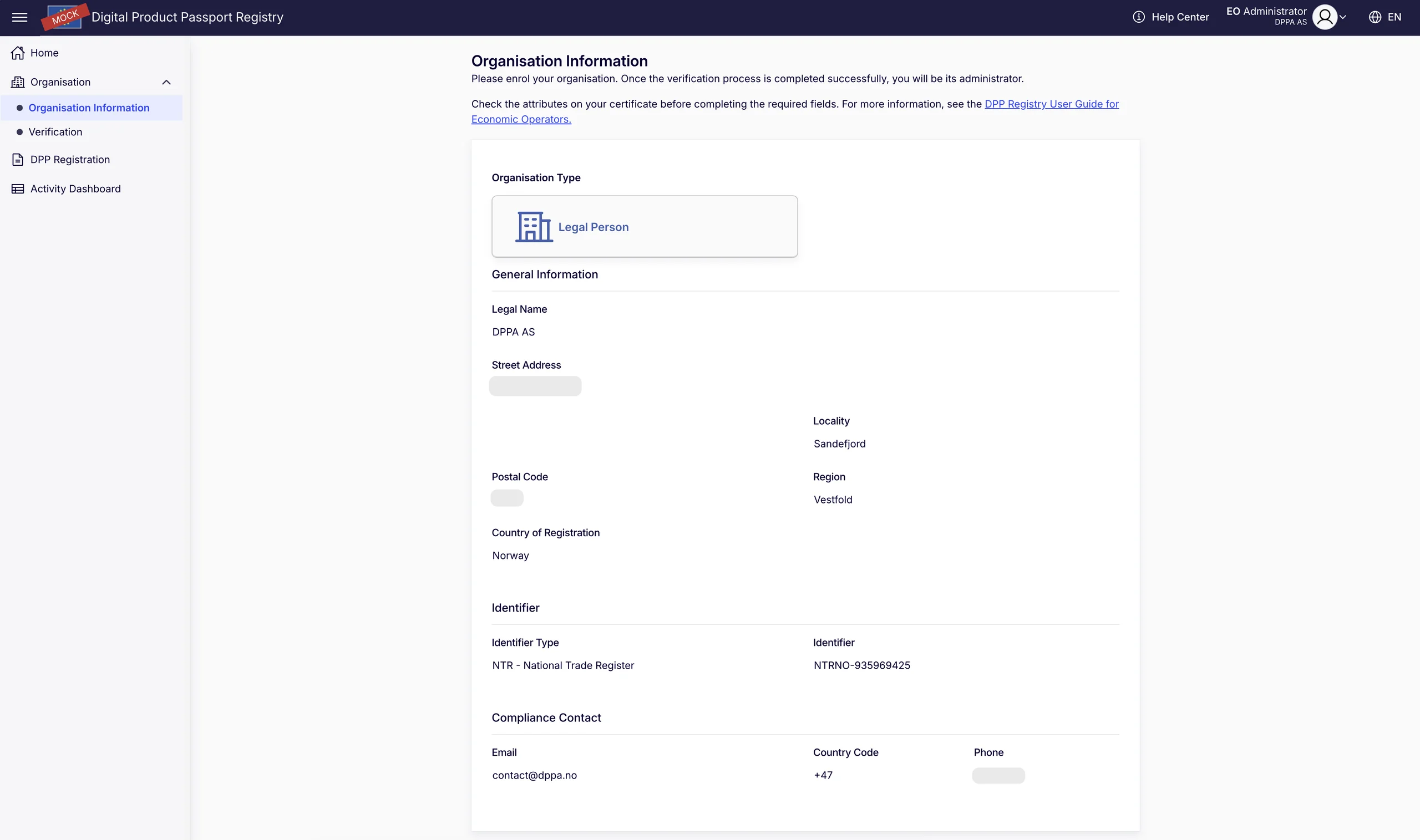
Create an EU Login account if you have none, then click “Enrol New Organisation,” choose “Legal Person,” and fill in the form. The registry is in English only, and so is the declaration it generates.
Three fields decide whether you pass:
| Field in the form | What to enter | What the registry does with it |
|---|---|---|
| Legal Name | The registered name, exactly as in your business register, including the legal form (for us, “AS”) | Compared letter by letter with the seal certificate |
| Country of Registration | The country of the register (Norway, in our case) | Compared with the certificate |
| Identifier Type and Identifier | The type your certificate uses. Ours is NTR (National Trade Register), which the registry lists as preferred. The value is the full string, for example NTRNO-123456789 for a Norwegian company | Compared with the certificate’s organization identifier |
Enter the registered address from your business register, even if your mail goes somewhere else.
Step 3. Request and download the sealed declaration
The Commission seals first. You seal second.
Click “Start Verification.” Enter the name and email of your legal representative, the person entitled to seal on behalf of the company. Click “Request Declaration.” A warning tells you that proceeding locks the organization data; if you change anything afterward, verification starts over. Confirm.
A few seconds later the PDF is ready. The registry calls it the PDF Declaration. It is a one-page declaration in English, listing your legal name, address, identifier, and compliance contact, with the Commission’s electronic seal already on it. Download it. Do not open it in an editor, do not print to PDF, do not “save as.” From here on, the only change this file may receive is your seal.
Step 4. Seal the PDF yourself
This happens outside the registry, and it is the step with the most ways to go wrong.
With Acrobat Reader on the Windows machine, the card in the reader, and the provider’s software installed, open the downloaded PDF. Before you sign, open Preferences, Signatures, Creation, and set the default signing format to “CAdES-Equivalent.” Acrobat’s default may not be PAdES compliant, and a declaration signed in the wrong format is rejected even if the certificate is perfect. The registry guide shows the exact screens.
Then add a digital signature, choose the sealing certificate (the one with the key usage “non-repudiation”), enter the PIN, and save when Acrobat asks. Once. The finished file has exactly two signatures: the Commission’s and yours. If you save it again afterward, the registry may see a modified document, and that fails.
If you chose a remote seal, the sealing happens in the seal provider’s service instead. The format and the two-signature rule are the same.
Before uploading, check the file in the Commission’s free DSS validation tool. You want three things on the result page: “Qualification: QESeal,” a signature format of PAdES-BASELINE-B or higher, and two valid signatures. If it says AdESeal-QC, the key is not on qualified hardware, and the registry will say the same.
Step 5. Upload, wait, and read the report
Back in the registry, upload the sealed PDF, click “Verify your Organisation,” and confirm. The check is automatic. The Activity Dashboard shows the request as processing, then as success or failure; for us the result came the same day, both times.
A failure comes with a report you can export. It lists every check that failed, one line per mismatched field, with the value you typed next to the value in the certificate. Read it before you change anything; it told us exactly what was wrong. A success comes with a report too, and it contains one date you need: when your seal expires.
With a success, you are the administrator of your organization in the registry.
Where does the verification go wrong?
Four of these eight stopped us. Six are covered in the Commission’s guide, which we should have read before we started; the Windows machine and the two certificates are not. Five of the eight break one of the three comparisons above.
- Planning around a certificate you already have. If the business certificate your company uses today was delivered as a file, the registry rejects it (the DSS tool in Step 4 shows it as AdESeal-QC).
- Having no Windows machine. The software for our card did not come with it, and when we found it, it existed for Windows only; we work on Macs. Open-source tools could read the card but not unlock it, so the sealing ended up on an old Windows laptop with Acrobat Reader. Ask before you order where the software comes from and which operating systems it supports. Keep a Windows machine within reach anyway.
- Choosing the wrong certificate on the card. Our card carried two certificates, one for authentication and one for sealing, which is how business certificates on smart cards are commonly built in Norway. The registry accepts only the one issued as a qualified electronic seal, the one with the key usage “non-repudiation”; pick the other and the declaration is rejected. We had to ask the issuer’s support which was which. A seal provider in another country may give you a single certificate, or a remote seal with no card at all; the rule is the same, only the seal certificate passes.
- Leaving Acrobat on its default signing format. The certificate can be perfect and the declaration still fails, because the signature was embedded in a format the registry does not accept. Set the format before you sign (the setting is in Step 4).
- Touching the file. Opening the declaration in an editor before sealing, or saving it again after, can leave the registry looking at a modified document. The rule: exactly two signatures, and nothing else changed.
- Typing the registration number alone. This one cost us the most time. We entered our organization number by itself, the way the guide that came with the card implied. Rejected. The registry compares the field with the value in the certificate character for character, and the certificate carries the type, the country code, and a hyphen in front of the number (the Commission’s own example is NTRGR-98765, for a Greek company). We did the entire verification again, the same day, and it passed.
- Changing the company details after you request the declaration. Requesting it locks the organization data; editing the data afterward starts the verification over. Check the form against the certificate first.
- Using one EU Login for both environments. Test and production each need their own account.
What can you do in the registry once you are verified?
Keep the status alive and prepare your first registration. As of November 17, 2026, the registry’s test environment still turns a passport away.
The upkeep is short: put the seal’s expiry date from the success report in the calendar (with a reminder three months ahead), invite the colleagues who need access, and tell your passport provider that you are verified. Verified status ends on the expiry date or three years after verification, whichever comes first. From then on you can neither register new passports nor change what you have registered until the company has been verified again with a valid seal.
Registering a passport is a separate job from getting in. For now the registry takes batteries only, one registration per individual battery, through a web form or a JSON or XML file with up to 100 passports.
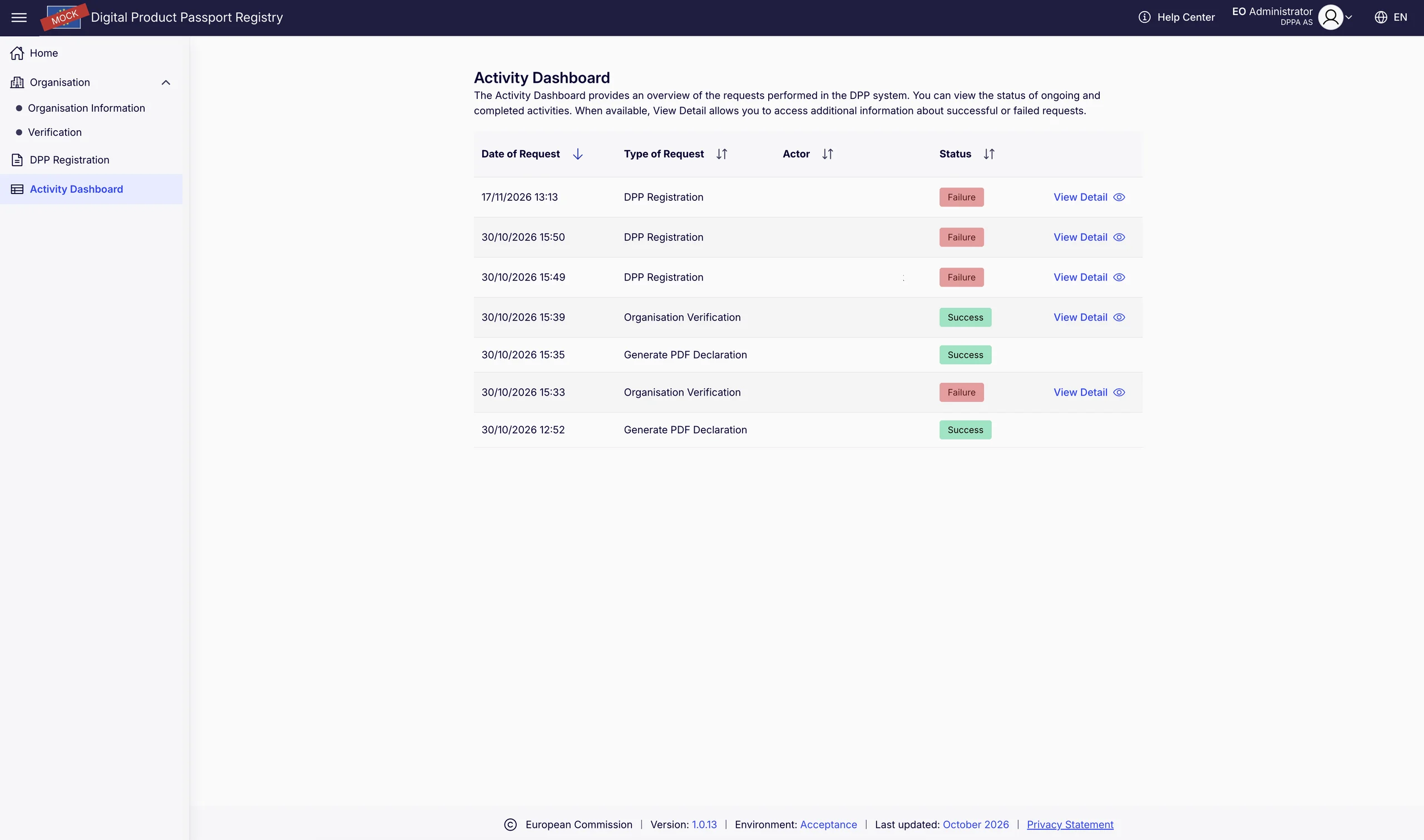
When we tried in October, the answer was a rejection. The first message the registry gave us after we got in was “Semantic validation failed due to its unavailability.” Our registration file passed the schema check, the duplicate check, and the URL check, and failed on a step that did not exist yet. The Commission’s user guide, version 1.03 of September 16, 2026, says the same on the registration page itself: “Successful registration of DPPs for batteries is not currently available, as the semantic catalogue for this product group has not yet been defined. Currently, it is not possible to successfully register DPPs.” The semantic catalogue is the data model the registry checks a submitted passport against.
That is changing. On November 16, 2026, the Commission published a set of technical guidelines dated October 30: the data definitions and validation rules for battery passports, an API specification with an integration guide, a guide to service accounts for machine-to-machine access, and a guide for passports hosted on your own infrastructure. It says the features described in them “will become available progressively.” The user guide has not been updated, and nothing says on which day a registration will start to succeed.
We tried again in the test environment on November 17, the day after the publication. The answer was the same message as in October.
The state on November 17, 2026: the data model that was missing is published, the API is specified, and the validation step is still switched off where we can test it. Until someone shows you an accepted registration, treat a claim of a live registry integration with care.
We resubmit our test passport at regular intervals and will update this article when the answer changes.
Does this work for a company outside the EU, such as ours in Norway?
Yes. We are the proof, and the rules apply at the border whether or not your country has adopted them.
Norway is in the EEA, not the EU. Regulation 2026/1778 is marked EEA relevant and has not been taken into the EEA Agreement. ESPR itself moved one step in October 2026, when a draft decision to incorporate it was sent to the Commission; no decision has been taken, and the registry regulation has not reached that step. None of that stopped us from enrolling. DPPA AS is verified in the production registry with identifier type NTR and country Norway, and the verification ran through without any question about EEA status. The Commission’s battery passport FAQ says the same in general terms: an operator outside the EU can create an account and register once it is verified, and a battery passport is registered by the operator that places the battery on the EU market.
The obligation does not wait for Oslo either. The moment you place a product on the EU market, the EU rules for that product apply to you, whoever you are. The Norwegian Environment Agency (Miljødirektoratet) has said in its consultation on the Norwegian battery regulation that the registry requirement is meant to apply from February 18, 2027, provided the rules are in force in Norway by then. For a Norwegian battery exporter, the date is February 18, 2027, in either case.
A company outside the EU and the EEA faces the same border logic, with one more constraint: the registry recognizes only eIDAS-qualified seals, so the seal has to come from a provider on the EU/EEA trusted list, and the identifier has to be one of the types the registry accepts. We have not tested that path ourselves.
FAQ
What is the EU DPP Registry, in one sentence?
A central index run by the European Commission that records which verified economic operator registered which passport and where it is hosted; the passport data stays with you or your passport provider.
How do I register my company in the EU DPP Registry?
You enroll it once. Create an EU Login, fill in the organization form, download the PDF declaration the Commission has sealed, add your company’s qualified electronic seal (QSeal), and upload it. The registry verifies the file automatically. The registry calls this enrollment; registering is what you do later with each passport.
Who can enroll?
Any economic operator as defined in ESPR: a manufacturer, authorized representative, importer, distributor, dealer, or fulfillment service provider. A company enrolls as a legal person with a qualified electronic seal; a sole trader enrolls as a natural person with a qualified electronic signature.
Who is responsible for registering a passport?
The economic operator that places the product on the EU market. A passport provider can do the upload on your behalf, but the responsibility stays with you.
Can my DPP provider enroll for me?
No: the seal is issued to your legal entity, and the declaration is sealed by your representative. A provider that registers passports on your behalf must be verified itself, in addition to you, and the responsibility stays with you.
Does the company certificate we already use for public e-services work?
Only if it is a qualified electronic seal (QSeal) with the key on a smart card, USB token, or qualified remote service, and the certificate carries your registration number in the registry’s format: type, country code, hyphen, number (NTRNO-123456789 for a Norwegian company). A certificate delivered as a file is rejected. In Norway, check whether your Altinn certificate is a file or a card before you assume.
How do I find a provider of qualified seals?
Start from the EU/EEA trusted list and pick out the providers that issue qualified certificates for electronic seals to companies. Ask each of them where the private key is kept, what the certificate will say about your company, and when the seal can be delivered (the section on choosing a seal has all six questions). A seal from any provider on the list is valid across the EU and the EEA.
How long does it take, and what does it cost?
One to four weeks, nearly all of it waiting for the seal; ours took ten calendar days from order to verified. With the seal in hand, the enrollment itself can be done in a day. Budget roughly EUR 800 before VAT for a three-year seal; for the registry itself, the Commission’s guide says no subscription fee is expected.
How long does verification last?
Up to three years, or until the seal expires, whichever comes first. The success report tells you the date.
Can I register a battery passport today?
Not yet, as far as it can be tested. Our registrations in the test environment in October and on November 17, 2026, were both rejected with “Semantic validation failed due to its unavailability,” and the Commission’s user guide still says registration is not possible. The Commission published the data model for battery passports on November 16, 2026, and says the features will become available progressively. We will update this answer when a registration goes through.
Is there an API?
A specification, yes. The Commission published an API specification and an integration guide on November 16, 2026, and says the features will become available progressively. Until they are confirmed live, passports go in two ways: through the web form or as a file of up to 100.
Where do I get help?
The Commission’s helpdesk, EC-HELPDESK-DPP@ec.europa.eu, Monday to Friday 08:00 to 20:00 CET, or by phone on +32 2 296 04 31. The user guide is linked from the registry’s Help Center.
Sources
- Commission Implementing Regulation (EU) 2026/1778 on the registry, EUR-Lex
- ESPR, Regulation (EU) 2024/1781, EUR-Lex
- Battery Regulation (EU) 2023/1542, EUR-Lex
- eIDAS, Regulation (EU) No 910/2014, EUR-Lex
- European Commission: the DPP Registry page, the DPP Registry User Guide for Economic Operators, version 1.03, technical guidance for the registry, November 16, 2026, and the battery passport FAQ
- European Commission: the EU/EEA trusted list and the DSS validation tool
- EFTA EEA-Lex: the registry regulation and ESPR
- The Norwegian Environment Agency’s consultation on the battery regulation (in Norwegian)
DPPA AS has been a verified economic operator in the EU DPP Registry since October 2026, in the test environment as well as in production. We build Digital Product Passport infrastructure for manufacturers, with identifiers you own, and we have run one of our own passports through the registry as far as it will go, most recently in November 2026. Both founders are members of Standard Norge’s committee SN/K 624 (the Norwegian mirror of the European committee behind the passport standards). If you want to walk through your own enrollment before you order a seal, get in touch.


